Product

What ships
today

Everything on this page exists and runs right now. Where something is still in beta or still on the list, it says so in those words. We would rather lose a signup than describe a feature in the present tense before it works.

In the app 01 — 06
01

Prompt

Describe the board the way you would describe it to a colleague: what it senses, what it drives, what powers it, how long it has to last on a battery. Constraints in plain sentences are constraints Synqit can act on.

There is no blank canvas and no symbol library to learn before you start.
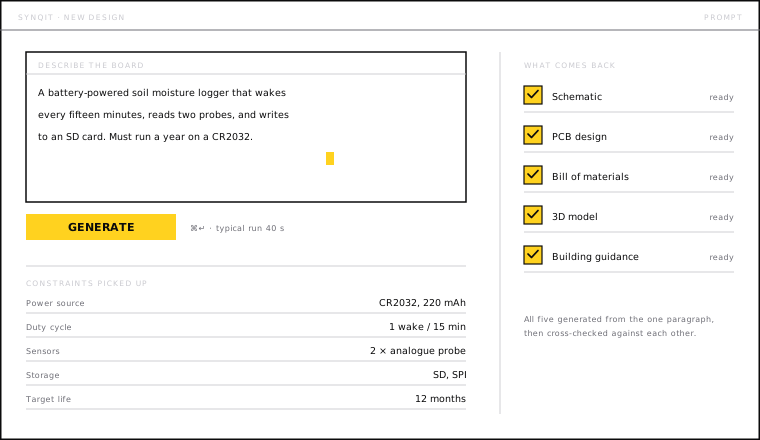
The Synqit prompt panel: a plain-language description of a soil moisture logger typed in, the constraints it picked up listed underneath, and the five deliverables marked ready.
One paragraph in. Five deliverables out.
02

Schematic

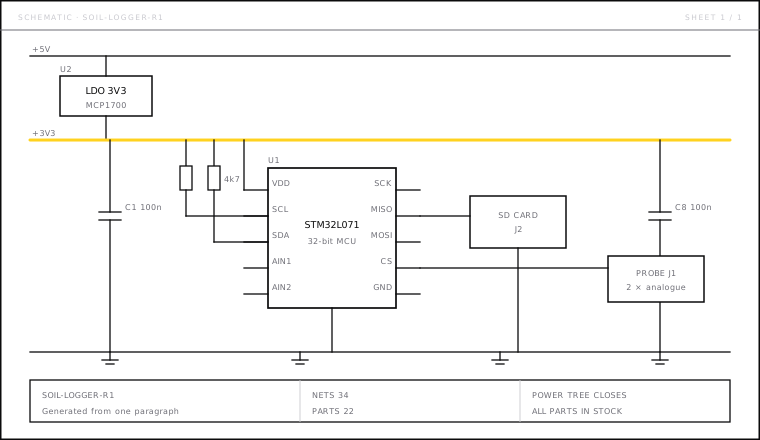
A full sheet with real manufacturer part numbers, a closed power tree, decoupling on every supply pin, and nets named the way a person would name them.

It renders as an ordinary schematic on purpose. The value is not that you never look at it — it is that you start from something worth looking at.

A generated schematic sheet with a 3V3 regulator, an STM32L071 microcontroller, decoupling capacitors, I2C pull-ups, an SD card socket and a probe connector, over a title block reading 34 nets and 22 parts.
Real part numbers, a power tree that closes, and a title block you can hand to anyone.
03

Verification

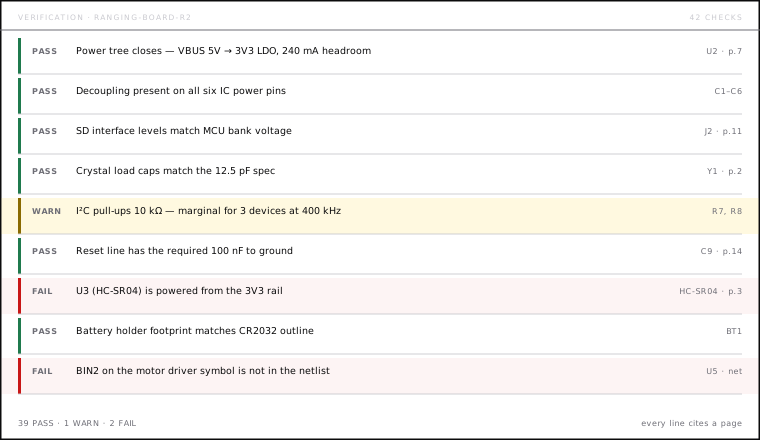
The pass runs rail by rail and net by net: supply voltages against absolute maximums, logic thresholds across every interface, current budgets under worst case, bus loading, unconnected inputs.

Each result is pass, warn or fail. Warnings are genuine judgement calls and say so.

A verification run listing nine checks with pass, warn and fail states, each citing a part reference and datasheet page.
Forty-two checks on this board. Every line cites the page it came from.
04

The citation

This is the feature the whole product rests on. Every failure names the part, the rail, the specific clause and the page of the manufacturer's datasheet it came from — and proposes a fix concrete enough to act on without a second opinion.

An uncited flag is an opinion. A cited flag is something you can check in ninety seconds and then trust.

Verification · detail 1 of 6
Fail U3 (HC-SR04) is powered from the 3V3 rail HC-SR04 · p.3 · §Electrical
Specified 5 V ±0.25 V at 15 mA. Below about 4.5 V the module stops triggering reliably — and it goes quiet rather than failing loudly, which is why this one usually costs a week of firmware debugging.

Fix: supply U3 from VBUS and level-shift ECHO down to 3V3 before the MCU pin — 2N7002 with 10 kΩ pull-ups, or a single TXS0102.
A real catch from the beta, rendered here as live text. Replace with screenshot 04assets/img/shot-04-catch.png — which is also the link-preview image at 1200×630.
05

Layout

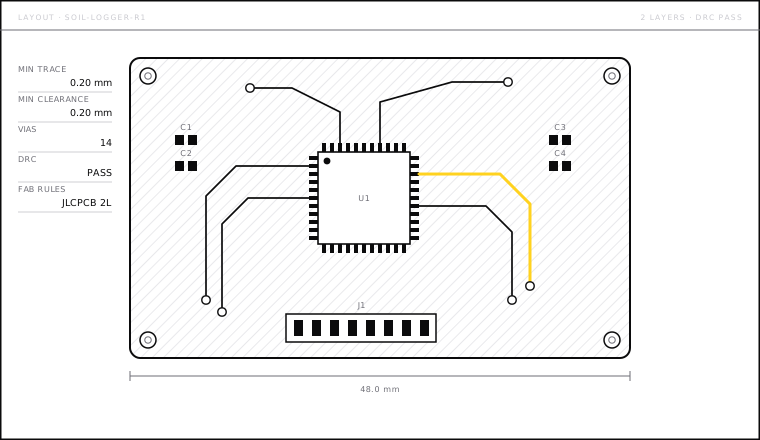
Placement, copper pour, trace widths sized to the current they carry, clearances checked against the fab rules you are actually ordering to. The design-rule check passes before you open a fab portal, not after they email you about it.

A two-layer board layout with a routed QFP footprint, vias, decoupling capacitor pads, an edge connector, mounting holes, a ground pour and a 48 mm dimension line.
Routed against the fab rules you are actually ordering to. DRC passes before you upload.
06

3D and bill of materials

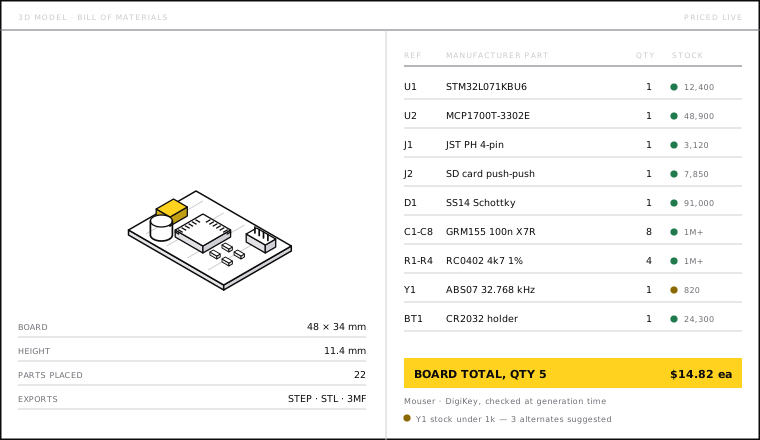
A turnable model of the populated board beside a bill of materials priced live against Mouser and DigiKey, with stock shown. You find out that the part you designed around has an eleven-week lead time now, rather than at the point of ordering.

An isometric render of the populated board beside a bill of materials listing nine line items with manufacturer part numbers, quantities and live stock levels, totalling $14.82 each.
The board in 3D beside what it costs, with stock checked at the moment it was generated.
How verification works Method

Read the document,
not the vibe

A language model that has absorbed a great deal of electronics can tell you what a part usually needs. That is not good enough to bet a board spin on. Synqit resolves each part to its actual datasheet, extracts the numbers that constrain it, and checks your design against those numbers.

When it cannot find a datasheet for a part, it says so and marks the check as unverified rather than guessing. An unverified check looks different from a passed one, deliberately.

A

Resolve

Each symbol is matched to a real manufacturer part number and that part's current datasheet revision.

B

Extract

Supply range, absolute maximums, logic thresholds, current draw, timing — pulled with the page and clause recorded.

C

Check

Your nets and rails are tested against those constraints under worst case, not typical case.

D

Cite

Every result carries its source back to you, so disagreeing with Synqit takes a minute rather than a meeting.

Limits Stated plainly

What Synqit
does not do

It does not certify that a design is safe. It tells you what it checked and what it found. Anything mains-powered, medical, automotive or airborne needs a qualified human and a real compliance process.

It does not manufacture. Export the Gerbers and the BOM and order from whoever you like. We do not take a cut of your fab order.

It does not lock your work in. Your design leaves as standard files that open in the EDA tool you already use.

It does not replace knowing what you are building. Synqit is fastest and safest in the hands of someone who can tell when it is wrong — and it is built so that telling is easy.

It does not claim to catch everything. A pass means every check we run passed. It does not mean the board works.

Try it against a board you already know is broken

The fastest way to judge this
is to use it

Start building Log in